
본문으로 바로가기
Flalingo

영어 연습

영어로 조언 글 쓰는 법 (B1+): 이유와 대안을 담은 휴대폰 사진 팁 세 가지

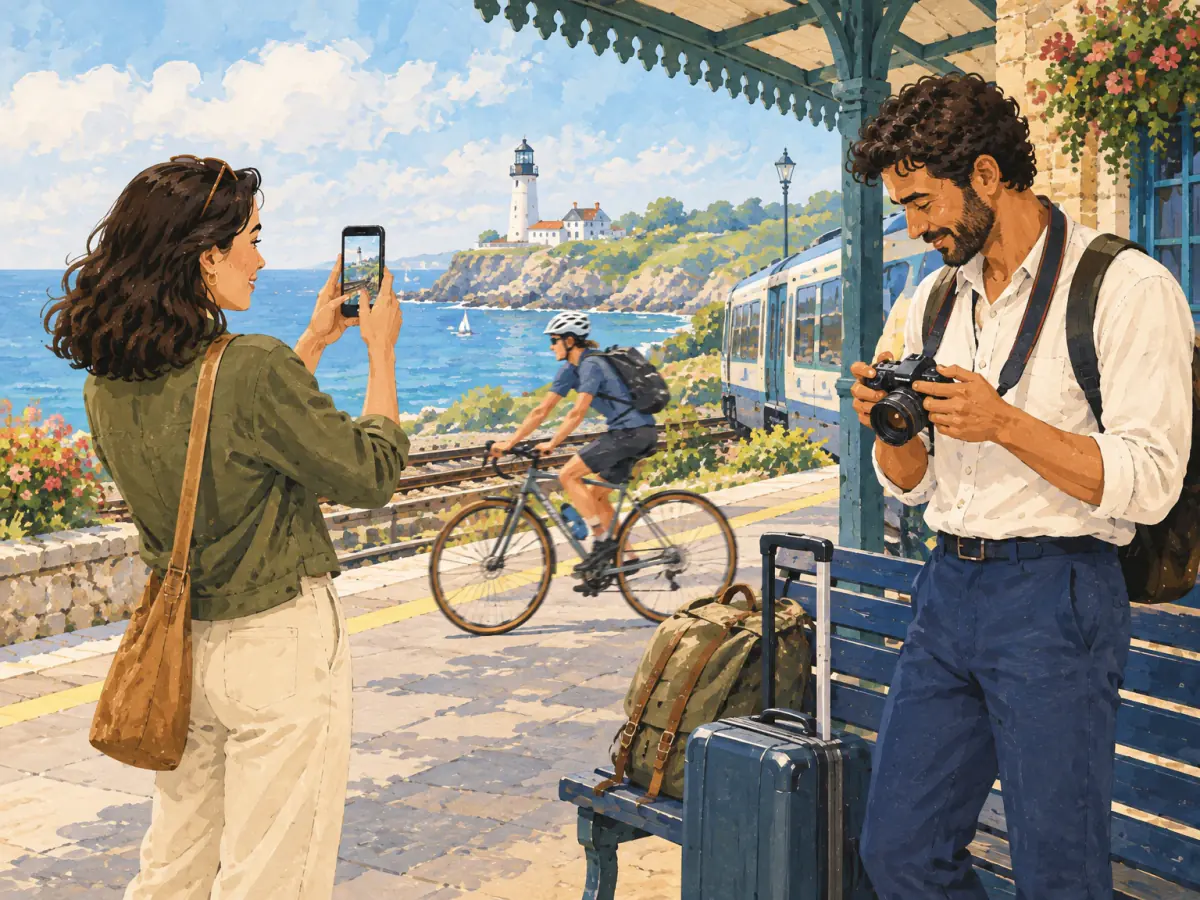
Two friends take photographs at a coastal station with a lighthouse and cyclist visible.

B1+(중급 후반) 영어 조언 글 가이드: 명령문과 부정 명령문, “because”와 “so”로 이유 말하기, “might”와 “could”로 대안 제시하기, 그리고 분명한 팁 세 가지를 만드는 휴대폰 사진 단어를 배워요.

좋은 영어 조언 글은 한 독자층에게 말을 걸고, 서로 다른 문제 세 가지를 해결해요. 소제목만 읽어도 조언이 보이도록 쓰는 것이 핵심이에요. 팁마다 세 부분이 있어요. 지시(“Move before you zoom.”), 이유(“Digital zoom can reduce detail.”), 그리고 현실적인 대안(“You might also take one close-up.”)이에요. 휴대폰 사진은 문제마다 원인이 분명해서 연습하기 좋은 주제예요. 이 B1+(중급 후반) 가이드는 영어로 한 조언이 명령조이거나, 막연하거나, 같은 말의 반복처럼 들리는 성인을 위한 내용이에요.

이 글이 맞는 분

  • 문장은 정확하게 쓰지만 지시가 명령처럼 들리거나, 이유를 설명하기 전에 끝나 버리는 중급 성인.
  • 영어로 실용적인 조언을 쓰는 분: 사용법 안내 글, 새 동료를 위한 가이드, 여행 모임이나 동호회 소식지에 실을 팁.
  • 휴대폰으로 사진을 많이 찍고, 무엇이 잘못됐는지 정확한 단어로 말하고 싶은 분: “out of focus”, “overexposed”, “too far away”.
  • 아직 이르다면: 시간, 계획, 연결어가 아직 헷갈린다면, 먼저 B1 초중급 수준에서 시간과 대안 계획이 있는 여행 일정표부터 써 보세요.
  • 너무 쉽다면: 팁에 이유와 대안을 이미 자연스럽게 넣는다면, B2로 넘어가 50단어 뼈대를 완성된 단편 소설로 늘려 보세요.

예시 학습 페이지 열기

예시 학습 페이지 열기

단어 카드

lens · wide-angle lens

A lens directs light into a camera; a wide-angle lens includes a broader scene.

Owen changed the lens because the wide-angle lens could include the whole platform.

take a photo · upload a photo

Create a picture with a camera; transfer a picture to an online service or device.

Take the photo first, but ask permission before you upload it.

zoom in

Make a distant subject appear larger in the frame

Instead of using digital zoom, Maya moved closer before zooming in slightly.

close-up

A photograph showing a subject from very near, with fine detail

She took a close-up of the salt crystals on the railing.

self-timer

A camera function that delays the shot so the photographer can enter the picture

They used the self-timer for a photograph of the whole group.

flash

A brief strong light used when taking a photograph

The flash lit the nearby sign but made the background disappear.

edit a photo

Change a photo's size, colour, brightness, or other qualities

He edited the photo to straighten the horizon and reduce the brightness.

camera settings

The adjustable controls that determine how a camera records an image

Check the camera settings before the train enters the station.

portrait mode / portrait setting

A camera option designed mainly for photographing a person, often with a softer background

Portrait mode kept Maya sharp while softening the station wall.

landscape mode · landscape

A setting for broad scenes; a landscape is a photograph or view of scenery

Owen used landscape mode for the bay and lighthouse.

in focus

Clear and sharply defined

The cyclist is in focus even though the train is moving.

out of focus

Unclear because the camera did not focus correctly or moved

The portrait was out of focus because the phone focused on the window.

overexposed

Too bright because too much light reached the image

The sky is overexposed, so its colour and cloud detail have disappeared.

camera mode and settings

The selected shooting program and its detailed controls

Changing the camera mode helped, but the exposure setting still needed adjustment.

대화

maya In the foreground, a cyclist is crossing the wet square. Owen is in the centre beside a blue suitcase, and the old clock is in the top left-hand corner. The lighthouse is only just visible in the distance.

owen First, clean the lens, because a fingerprint can soften the whole image. Next, switch off the flash and move nearer, so the wet ground keeps its colour. Then hold the phone with both hands and tap the cyclist to focus. Finally, take two versions and check them before you leave.

문장 형태

What should each tip contain?

Move before you zoom. Digital zoom can reduce detail, so walk nearer when it is safe. You might also take one wider landscape and one close-up; together they preserve both context and detail.

A useful tip gives a clear action, explains its benefit, and offers a realistic alternative.

  • imperative
  • Don't...
  • You might...
  • One possibility is...
  • because / so

추가 연습

Position every detail precisely

Maya and Owen take photographs at a coastal station with a lighthouse and cyclist visible.
in the foreground · in the background

In the near part of an image; in the area behind the main subjects

Maya and Owen are in the foreground, and a train is waiting in the background.

in the centre · in the distance

In the middle of the image; far away

A cyclist is in the centre, and a lighthouse is visible in the distance.

in the bottom right-hand corner

Near the lower-right edge of the image

Part of a blue bench is in the bottom right-hand corner.

in the top left-hand corner · at the top of

Near the upper-left edge; in the highest part of something

Clouds are in the top left-hand corner, and a lamp is at the top of the tall post.

behind · in front of

At the back of something; between something and the viewer

The bench is behind Owen, and he is holding his camera in front of him.

on top of · opposite

Resting on the highest surface; facing or across from something

A green backpack is on top of the bench, and Maya is standing opposite the lighthouse.

Write three tips for rescuing a difficult phone photo

What should each tip contain?

Move before you zoom. Digital zoom can reduce detail, so walk nearer when it is safe. You might also take one wider landscape and one close-up; together they preserve both context and detail.

A useful tip gives a clear action, explains its benefit, and offers a realistic alternative.

  • imperative
  • Don't...
  • You might...
  • One possibility is...
  • because / so
이 단원 배우기
어떻게 배우고 싶나요?
계정이 있나요?

무료 계정은 한 단원을 계속 열어 둘 수 있습니다.

먼저 계획하기: 한 독자층, 서로 다른 문제 세 가지

밤에 사진을 찍는 여행자처럼 독자층을 하나 고르고, 구도, 빛, 초점, 저장 중에서 원인이 서로 다른 문제 세 가지를 정하세요. 140~180단어면 제목, 한 문장짜리 도입, 소제목 세 개가 들어가요. 소제목은 꼬리표가 아니라 조언 자체로 쓰세요.

  • “Light”가 아니라 “Turn off the flash for distant views”.
  • “Focus”가 아니라 “Tap the face you want sharp”.
  • “Storage”가 아니라 “Keep every photo in two places”.
  • 두 팁의 원인이 같다면 하나를 바꾸세요.

완전한 팁: 행동, 이유, 대안

명령만 있는 팁은 독자에게 “왜?”라는 질문을 남겨요. 한국어는 “지문이 묻으면 화질이 흐려지니까 렌즈를 닦으세요”처럼 이유를 먼저 말하는 경우가 많지만, 영어 팁은 행동을 먼저 쓰고 “because” 뒤에 이유를 붙이는 편이 자연스러워요. 팁마다 세 부분을 넣으세요.

  • 행동은 명령문으로: “Move before you zoom.”
  • 이유는 원인이면 “because”, 결과면 “so”로: “Digital zoom can reduce detail, so walk nearer when it is safe.”
  • 대안은 “might”, “could”, “one possibility is”로: “You might also take one wider landscape and one close-up; together they preserve both context and detail.”
  • “so”는 “so that”의 뜻으로 목적을 나타내기도 해요: “Switch off the flash and move nearer, so the wet ground keeps its colour.”

명령이 아니라 안내처럼 들리는 지시

팁 글의 독자는 스스로 조언을 찾아 읽기 때문에, 명령문이 무례하지 않고 도움이 되게 들려요. 한국어는 “닦아”, “닦으세요”, “닦으십시오”처럼 높임에 따라 형태가 바뀌지만, 영어 명령문은 형태가 하나뿐이고 공손함은 맥락과 이유가 만들어요. 형태를 다양하게 써 보세요.

  • “Don’t” + 동사원형: “Don’t use the flash for distant buildings; it only reaches nearby objects.”
  • “Avoid” + “-ing”: “Avoid holding the phone with one hand in low light.”
  • “Try” + “-ing”는 “해 보고 효과가 있는지 확인하라”는 뜻이에요: “Try tapping the face on the screen.” “Try to” + 동사는 “애써 노력하라”는 뜻이에요: “Try to keep your elbows close to your body.”
  • 조언이 상황에 따라 달라진다면 “If” 조건을 먼저: “If the sky looks white, reduce the brightness before you take the photo.”

문제를 정확히 짚는 단어

막연한 조언은 “The photo is bad.”에서 멈춰요. 정확한 조언은 문제에 이름을 붙여요. 한국어 “초점이 맞다”와 “초점이 안 맞다”는 “in focus”와 “out of focus”, 사진을 “올리다”는 “upload”예요.

  • “out of focus”(초점이 안 맞은)와 “in focus”(초점이 맞은): “The portrait was out of focus because the phone focused on the window.”
  • “overexposed”(노출 과다, 너무 밝은): “The sky is overexposed, so its colour and cloud detail have disappeared.”
  • “self-timer”(셀프타이머): “They used the self-timer for a photograph of the whole group.”
  • “portrait”와 “landscape”: “portrait setting”은 인물을 선명하게 두고 배경을 흐리게 해요. “landscape”는 넓은 풍경이에요. 두 단어는 세로 사진과 가로 사진이라는 뜻도 있어요.
  • “upload”(올리다): “Take the photo first, but ask permission before you upload it.”

들어 보세요: 어려운 사진 한 장을 위한 네 단계

“because”와 “so” 뒤의 이유, “tap the cyclist to focus”에 담긴 목적, 그리고 “First”, “Next”, “Then”, “Finally”가 단계를 어떻게 정리하는지 들어 보세요.

Owen First, clean the lens, because a fingerprint can soften the whole image. Next, switch off the flash and move nearer, so the wet ground keeps its colour. Then hold the phone with both hands and tap the cyclist to focus. Finally, take two versions and check them before you leave.

나에게 맞는 방법으로 이 단원 배우기

쓰기 전에 이야기해 볼 질문

먼저 소리 내어 답해 보세요. 그때 말한 이유가 팁의 이유가 되는 경우가 많아요.

  • “Is it better to edit a photo or to take it again?”
  • “Should you ask permission before you upload a photo of someone?”
  • “Do phone cameras make people better photographers, or just faster ones?”

자주 하는 실수

초안에서 다음을 확인하세요.

  • “Don’t to use the flash.” “Don’t” 뒤에는 동사원형을 써요: “Don’t use the flash.”
  • “Avoid to zoom.” “avoid” 뒤에는 “-ing”를 써요: “Avoid zooming.”
  • “Make a photo.” 영어에서는 “take a photo”라고 해요.
  • 이유 없는 팁: “Use the self-timer.” 이유를 더하세요: “Use the self-timer, so you can be in the group photo too.”
  • 원인이 같은 팁 세 개. 예를 들어 설정을 바꾸는 방법만 세 가지 늘어놓기.

하루 10분 연습법

팁은 쓰기 전에 먼저 소리 내어 말해 보세요. 주말에는 40분 동안 글 전체를 써 보세요.

  • 2분: 사진 단어 카드를 듣고 예문을 따라 말하세요.
  • 3분: 휴대폰의 마지막 사진에서 문제 하나를 정확한 단어로 말하세요.
  • 3분: 그 문제에 대한 팁을 하나 쓰세요. 행동, 이유, 대안.
  • 2분: 소리 내어 읽고 스스로 물어보세요: “Why?” “What if I can’t?” 두 질문에 모두 답하는 팁만 남기세요.

다음 단계

같은 수준에서는 방을 네 문단으로 묘사하거나, 여행 소식을 연결된 메시지 다섯 개로 보내 보세요. 그다음에는 프로필에서 직업적 강점 두 가지를 근거로 뒷받침해 보세요. B2에서는 50단어 뼈대를 완성된 단편 소설로 늘려 보세요.

자주 묻는 질문

영어로 팁 글은 어떻게 쓰나요?

독자층 하나와 원인이 서로 다른 문제 세 가지를 고르세요. 조언이 드러나는 소제목 아래에 지시, “because”나 “so”를 쓴 이유, “might”나 “could”를 쓴 대안을 쓰세요.

영어 명령문은 무례하게 들리나요?

조언이나 안내에서는 그렇지 않아요. 독자는 “Clean the lens.” 같은 문장을 기대해요. 대화에서는 이렇게 부드럽게 말하세요: “You could…” “It might help to…”

“try doing”과 “try to do”는 어떻게 다른가요?

“Try tapping the screen”: 해 보고 도움이 되는지 확인하라는 뜻이에요. “Try to keep the phone still”: 애써 노력하라는 뜻이에요.

이 단원 배우기
어떻게 배우고 싶나요?
계정이 있나요?

무료 계정은 한 단원을 계속 열어 둘 수 있습니다.

다음에는 무엇을 할까요?

Flai로 계속 연습하세요

Flai는 음성 대화, 교정 내용, 수업 보고서로 말하기 연습을 돕는 Flalingo의 AI 말하기 앱입니다.

라이브 선생님과 배우기

Flalingo 수업에서는 이런 단원을 라이브 선생님과 1:1로 연습합니다.